PacketCircle 1.2.6 — Infrastructure Map on iPhone, and Expert findings that stay on topic
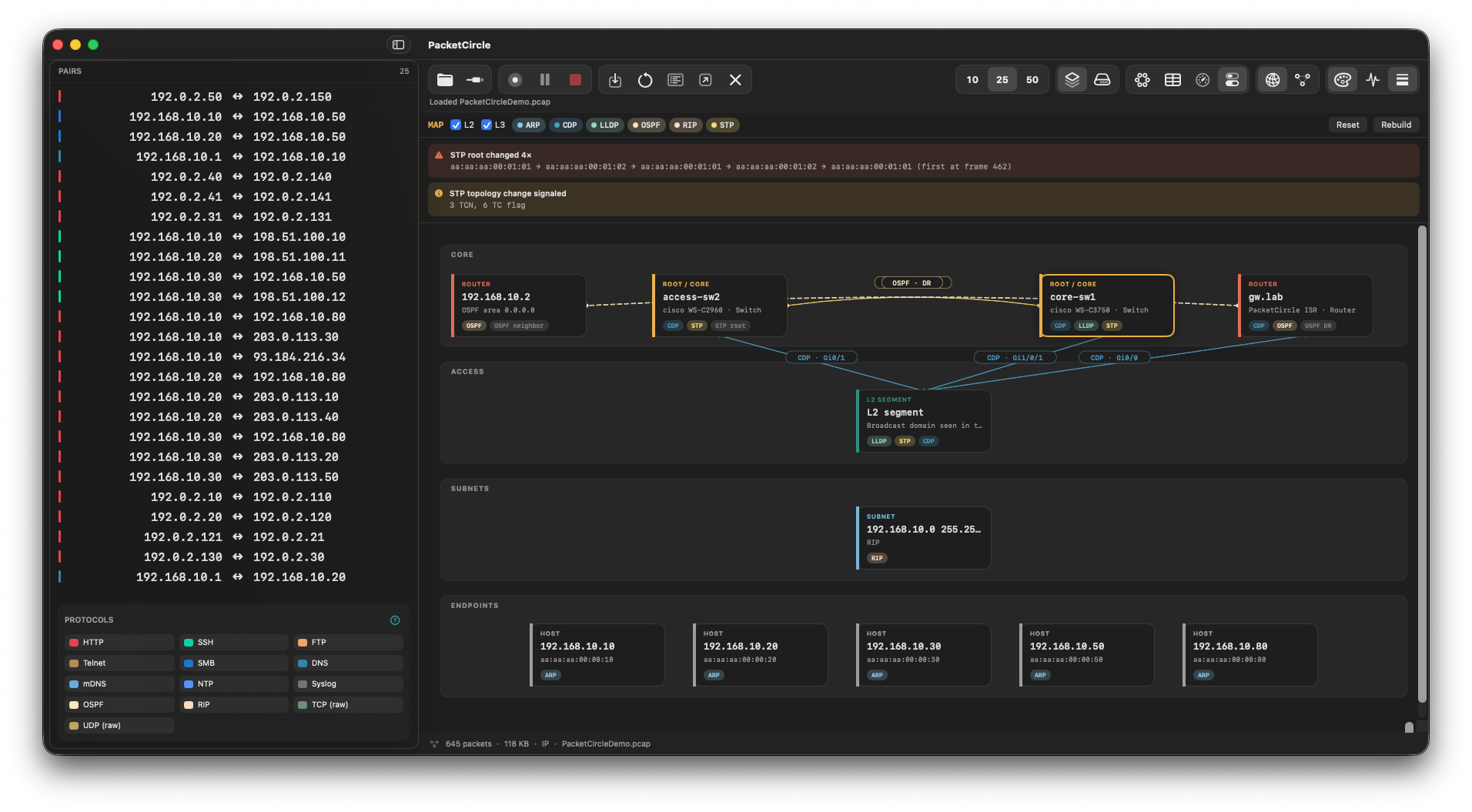
The Infrastructure Map comes to iPhone as a third Circle layout, built from the switching and routing protocols in your capture. Expert findings in Session details now follow the socket you are looking at, so an HTTP conversation no longer shows FTP or mail alerts from the same pair of hosts. Still native analysis, on device — not Wireshark.
- New third Circle layout: Hosts → Services → Map.
- Core / Distribution / Access drawing learned from STP, CDP, LLDP, OSPF, BGP, EIGRP, IS-IS, RIP and ARP in the capture — devices that never spoke in the trace are left out on purpose.
- Toggle L2 and L3 separately; STP root changes and topology-change signals appear as alerts above the map.
- Tap a switch or router to open its Session details.
- Don’t need it? Options → Circle → Show Infrastructure Map turns it off (Mac: Settings → General → Circle).
- Pick a socket (for example TCP 80) and the Expert list shows only that service’s findings, that socket’s TCP health, and host-wide network or link findings.
- A short note tells you when more findings sit on other sockets of the same conversation.
- New Other sockets list at the bottom of Session details: switch sockets in one tap, with a warning marker on the ones that have alerts. Whole conversation is one tap away.
- Circle (Mac Settings · iOS Options): show or hide the Expert Alerts strip, the Conversation quality bar, and the Map layout.
- Conversation details: show or hide Expert findings and TCP session quality panels. Services and decode always stay available.
- NetBIOS Name Service: queries, responses, name records and NBSTAT name tables — names also feed the host labels.
- NetBIOS Datagram and the Windows Browser protocol (
\\MAILSLOT\\BROWSEhost announcements, elections). - Separate labels for NetBIOS-NS, NetBIOS-DGM and NetBIOS-SSN (ports 137–139).
- Kerberos findings only on Kerberos traffic (ports 88 / 464) — no more false alarms on unrelated TCP streams.
- Jumbo / giant frame findings based on the real on-wire frame size.
- Same finding on two services of one conversation (for example HTTP 404 on :80 and :8080) is now listed per socket.
- Mac: right-click a TCP reset (or another alert) → Treat as normal for this conversation; manage exceptions in Settings → Expert.
- Fixed a crash when decoding certain Windows Browser election packets.
- Reset always returns the Circle to the IP view, even after filtering on link-layer (DLC) alerts.
- Show host names is on by default for new installs.
- Services layout line thickness better reflects traffic volume.
- Mac: recent captures on the start screen use one clean line each.
PacketCircle for iOS 1.2.5 — PCAP over IP, Sanitize, and PDF Reports arrive on iPhone
PacketCircle for iOS 1.2.5 just passed App Store review — the first iOS release to carry over three of the Mac/Wireshark-plugin Pro features: PCAP over IP remote capture (connect out to a sensor running pcapoverip or PolarProxy, the same convention Wireshark uses with -k -i TCP@host:port), on-device Sanitize (the PacketSanitizerPro payload-scrubbing modes, native on iPhone/iPad), and native PDF Report generation (the PacketReporterPro report set, built with the same pipeline as the Mac app). Still free, no ads, no telemetry, fully offline.
PacketCircle 1.2.4 — Capture/decode depth and iOS live-stream polish
More of the wire gets decoded natively, and remote live capture gets easier to reach and more honest when it breaks. Still native analysis, on device — not Wireshark.
- IGMP / MLD decode — group addresses, v1/v2/v3 queries and reports (source lists, INCLUDE/EXCLUDE), well-known multicast labels (SSDP, mDNS, all-systems).
- TLS on HTTP alt ports — HTTPS on 8080 / 80xx / 8888 is labeled TLS when the payload is a TLS record; plaintext HTTP on those ports stays HTTP.
- PCAP over IP (client) — connect to a remote classic-PCAP stream (TCP@host:57012), same idea as Wireshark -k -i TCP@host:port.
- Payload NetFlow / syslog — custom collector ports (e.g. UDP 515) classify from the datagram, not only IANA 2055/514.
- Richer mDNS — Bonjour service types, cache-flush / QU, additional A/AAAA.
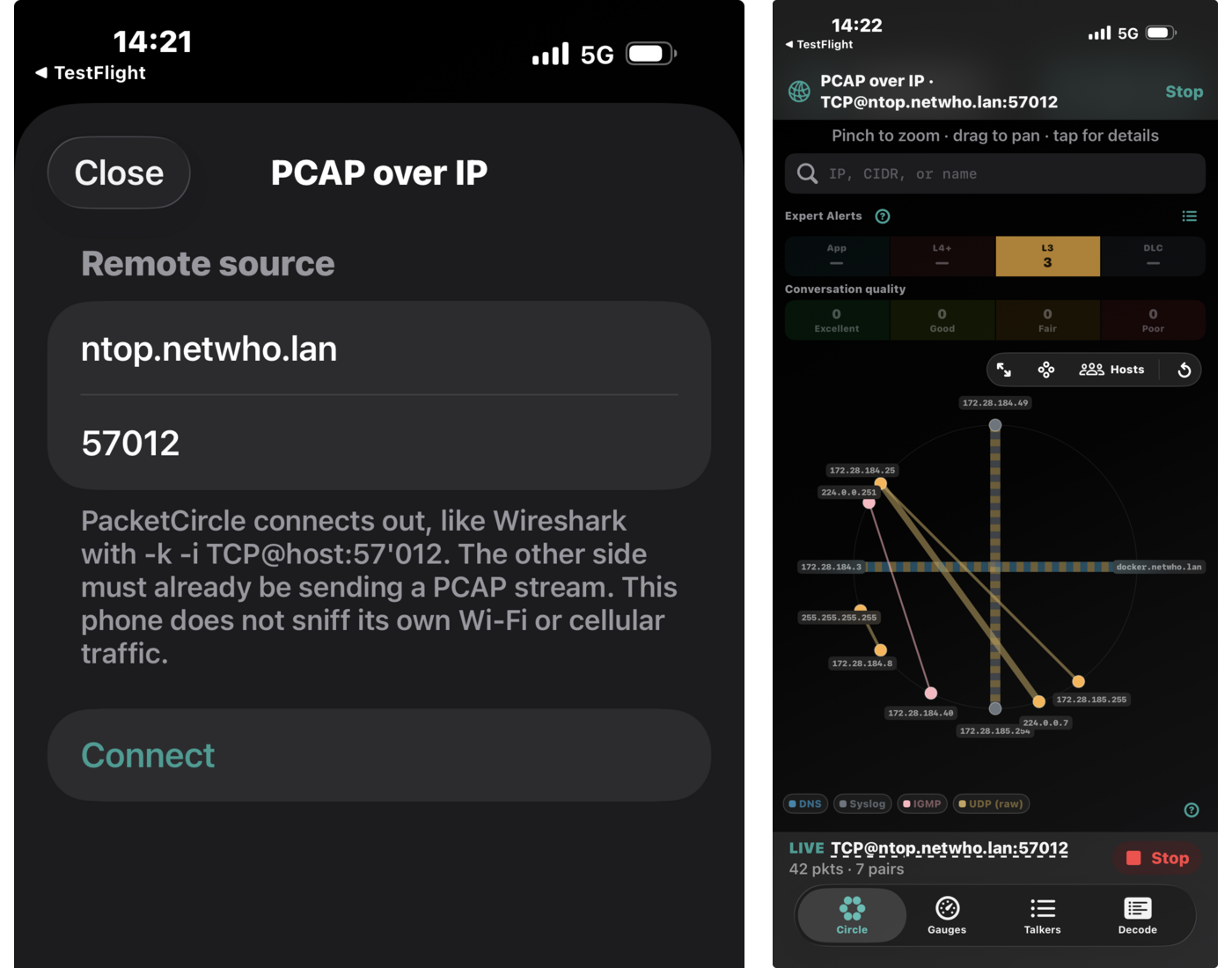
- Live PCAP-over-IP no longer re-analyzes the whole file every second or re-packs the Circle ring.
- iOS remote-connect failures no longer look like a Files import error; invalid host/port is shown in the sheet.
- Options → PCAP over IP waits for Options to dismiss before presenting the connect sheet.
PacketCircle 1.2.3 — Display filter, Expert Alerts, and tunable thresholds
Decode now has a Wireshark-style display filter beside search. Reports (Detailed and Field guide) include an Expert messages section built from the capture-wide expert modules. Settings → Expert exposes the thresholds that actually differ from network to network. Still native analysis, on device — not Wireshark.
- Display filter next to text/hex search (Mac window and iPhone tab).
- Familiar syntax: tcp, tcp.port == 80, ip.addr == 10.0.0.1, http and tcp.flags.syn, contains, and/or/not.
- Autocomplete from PacketCircle’s catalog only. Unknown names (ospf, wlan, tcp.stream) turn the filter red and do not silently match.
- tcp.analysis.* for experts I raise myself: retransmission, spurious retransmission, ACKed unseen, zero window, duplicate ACK.
- ARP request storm (who-has burst per second) and ARP unanswered (retried who-has with no reply in the file).
- Experts on the Circle toolbar (after Top 10/25/50): show conversations with warn/error alerts, not only the busiest (cap 250). Solo an Expert Alerts band first to restrict the layer.
- Duplicate-IP, local routing / hairpin, ICMP, HTTP/TLS/apps, and TCP quality experts as before.
- New Expert messages section (Detailed + Field guide): type, description, counters, sample nodes/pairs.
- Per type: what triggered it, typical use, and when the finding can be informational — present in the capture without proving a connectivity or performance outage (SPAN duplicates, traceroute TTL=1, jumbo frames, one-sided unanswered ARP, HTTP 404, encrypted TLS alerts, and similar).
Sliders for thresholds that vary by LAN:
- ARP storm warning / error (who-has per second)
- Unanswered ARP retry count
- Giant-frame size (raise this on jumbo/storage fabrics)
- Endpoint retransmit % and zero-window count
ARP sliders apply immediately to Expert Alerts and the report. Giant-frame size applies the next time the capture is analyzed.
- ICMPv6 Neighbor Solicitation no longer shows as a UUID-looking source to solicited-node multicast; DAD self-pairs are omitted.
- IP communication-matrix legend uses the same volume coloring as the chords (teal → red).
- Recent captures and drag-and-drop open on Mac.
PacketCircle 1.2.2 — Wireshark-style display filter in Decode
Decode now has a display filter next to the existing text/hex search, on the Mac window and the iPhone tab. It takes the Wireshark syntax I already know for the protocols and fields PacketCircle actually decodes, with autocomplete as I type: tcp, tcp.port == 80, ip.addr == 10.0.0.1, http and tcp.flags.syn, chained with contains, and/or/not. Autocomplete only offers names from PacketCircle’s own catalog, not Wireshark’s full field tree — unsupported names like ospf, wlan, or tcp.stream turn the filter red and leave the packet list untouched instead of silently matching nothing. The tcp.analysis.* terms — retransmission, spurious retransmission, ACKed unseen, zero window, duplicate ACK — come from PacketCircle’s own per-packet experts, not a port of Wireshark’s analysis engine, so early-retransmission and TCP SACK sequence behaviour reflects how PacketCircle itself decodes the stream, not how Wireshark would.
PacketCircle for macOS 1.2.1 — Tech Preview
Since 1.1.0, the Mac build moves from “circle + decode + TCP health” to a fuller triage workflow: an OSI-layered Expert Alerts strip on the Circle (App → L4+ → L3 → DLC) that you can filter, browse, and suppress noisy alert types; richer Decode with per-frame Expert Info and honest cleartext-vs-encrypted TLS alerts; the 1.2.0 Pro tools shell with native Sanitize Capture and PDF Generate Report; side-by-side Compare Conversations; and a topology Map with STP context.
PacketCircle for iOS is live on the App Store
PacketCircle for iPhone (1.1.0) just passed App Store review — free, no ads, no in-app purchases, no telemetry, and fully offline. It’s the mobile counterpart to the Wireshark plugin: load a PCAP/PCAPNG and get the same circle-first view of who’s talking to whom, plus native TCP session health, Follow TCP Stream, and a built-in demo capture to try it without a file. Full write-up below covers the why, the App Store constraints (no live capture, no GPL code shipped), and the complete feature list.
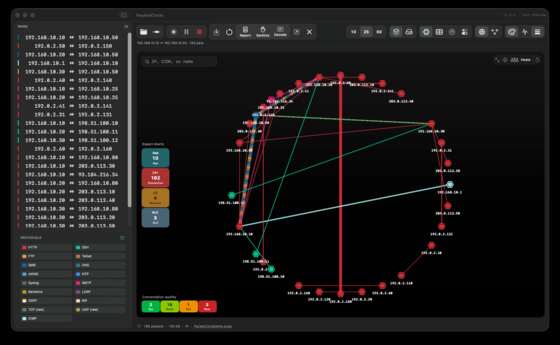
Sneak preview: the macOS Infrastructure View
The macOS build (private Tech Preview) is picking up analysis modules the iOS/Wireshark-plugin side doesn’t have yet. The newest one is an Infrastructure View that reconstructs your routing/switching topology directly from control-plane chatter in the capture — CDP, LLDP, STP, OSPF, ARP, RIP and friends — and lays it out as Core / Access / Subnets / Endpoints, complete with STP root-change and topology-change alerts. No config access, no SNMP: just what the wire already told you. Still shaping up, but early enough to share.